
NADRA Tracking — Check Your Application Status Online, SMS (8400) & Pak-ID App
Track your CNIC, NICOP, CRC, or FRC application instantly using SMS, Pak-ID app, or NADRA helpline — plus complete guides for every NADRA service in Pakistan.
Quick Access – Find your nADRA service instantly

NADRA Tracking Tool – Check Your Status Instantly
To Check your NADRA Application Status Online, Download the Official App using the following Links:
- Android (Google Play, Google Play Store): https://play.google.com/store/apps/details id=pk.gov.nadra.pakid&pcampaignid=web_share
- iPhone (App Store, Apple App Store): https://apps.apple.com/us/app/pak-identity/id1563975817
After the Pak Identity app is Installed, Open it and Enter your Tracking ID to View the Latest Status of your Application. The Tracking ID is a Reference available on your Application Confirmation, Confirmation, or Receipt.
You can also Track your application using the 10-digit number Printed on the receipt. In Pakistan, updates are Available Directly through the Web Portal or by Texting 8400 via SMS. The provided Links help users Quickly access their Status, verify their Identity, and check the Latest details related to their application without repeatedly Visiting an office.
What is a NADRA Tracking ID?
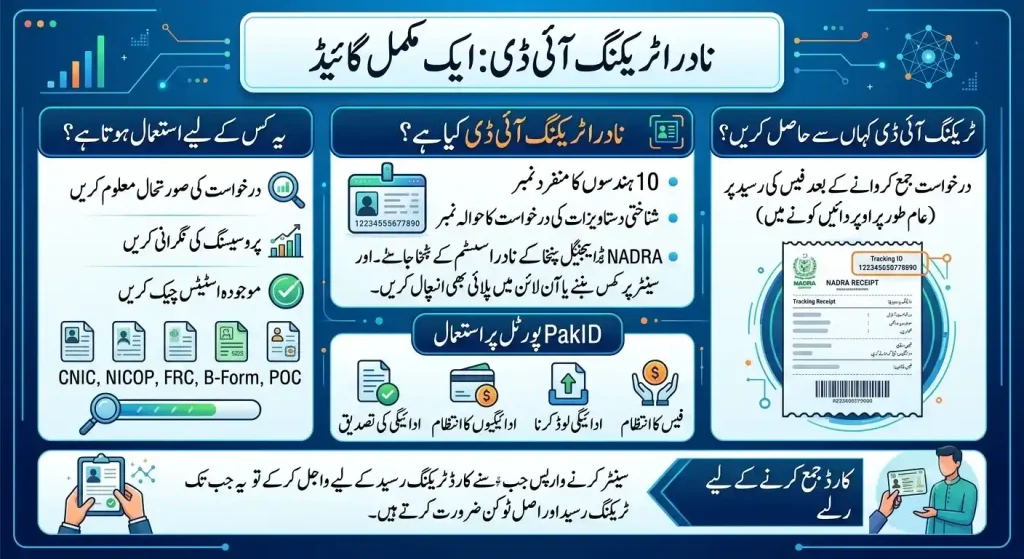
NADRA Tracking ID is a unique 10-digit number and unique reference number assigned to an application submitted for an identity document or identity document application through the National Database and Registration Authority (NADRA). It acts as a digital identifier within the NADRA system and helps users track application status, monitor processing, and check the current status of a CNIC, NICOP, FRC, B-Form, POC, or other document during the processing pipeline. Whether the request is made at a NADRA Registration Center or submitted online, the tracking ID remains linked to the application until completion.
The number is available on the fee receipt, usually in the top right corner, after the application is submitted. It can be used to manage fees, handle payments, upload payments, and verify payments through the PakID Portal. At any point, users can check their application status, and when returning to the center to collect card, they may need the tracking receipt and original token to receive the ID card or final document after applying.
How Does a NADRA Tracking ID Work?
A Tracking ID is a unique ID, single reference, identifier, and query key used by NADRA, the National Database and Registration Authority, to connect an application with its application record in the NADRA central database. When a specific request is submitted, the Tracking ID is generated, attached, and linked to the application process within the internal processing system, system, and related systems. It helps track different stages, including review, verification, and completion, while showing the current status, latest update, and progress information.
To check status, users can enter the tracking number through official tracking channels and official methods such as SMS, 8400, helpline support, Pak-ID, Pak Identity, the Pak-ID app, a NADRA registration center, the online portal, or the NADRA online portal. The system retrieves the application’s current processing stage in real time, locates the related record, and displays a live status that reflects updates from submission to printing, dispatch, and collection until the process ends. The Tracking ID does not process or change information; it functions as a read-only reference that allows updates to remain available consistently through all available links.
How Many Digits Are in a NADRA Tracking ID?
For a NADRA Application such as CNIC, NICOP, or POC, the Application Tracking ID is a Generated Number that helps you Check Online and track your Application Status. The Tracking ID is usually 12 Digits long and is Printed on the Top Corner of your Official Receipt.
Some Older Receipts and Regional Receipts may Feature a 10-Digit Tracking Number. The number Received on your Receipt can also be linked to a Specific Token when you Apply for a service
Where Can I Find My NADRA Tracking ID?
Application Channels: The Tracking ID is shared through multiple channels after an application is completed. You can check an application receipt issued by NADRA at a center or Mega Center after submission, review a confirmation SMS sent to your registered mobile number shortly after applying, access a confirmation email if you applied through the Pak-ID online portal, or open the Pak-ID app to view records under My Applications, application history, or an existing account. These sources provide access to your NADRA Tracking ID, a 10-digit number used to monitor the processing status of identity documents including CNIC, NICOP, and FRC.
Physical vs Online Access: A Physical Application submitted at a NADRA Registration Centre usually displays the 10-digit ID printed in the top right corner of a paper token, receipt, official application receipt, or confirmation slip collected from the counter during registration at the centre. In contrast, an Online Application completed through PakID Web, PakID App, PakID Portal, Dashboard, Inbox, or Applications tab allows users to find tracking IDs for ongoing applications digitally. Both methods support tracking, status, identity, and documents management, while an SMS received in Pakistan may contain a 10-digit tracking ID included in the confirmation message sent to your mobile device.
Lost Receipt Recovery: If you have a lost receipt, misplaced token, lost record, or an erased copy, you can retrieve information without a physical receipt. There is no need to worry, as recovery is usually easily completed through official support channels.
Helpline Verification: You can Call the Helpline, dial 1777 from a mobile phone, contact support, and Provide Details to a representative. The verification process typically requires a 13-digit CNIC number to verify personal details and complete verification before the tracking information is shared.
Overseas Support: For an Overseas Call from outside Pakistan, users can contact +92 51 111 786 100 and reach the Islamabad call centre. This service is designed for overseas applicants who need assistance through an international call and cannot access local support options.
How to Check NADRA Tracking ID Status — 4 Official Methods
NADRA provides four official channels to check your application status: SMS, online portal, mobile app, and helpline. Each method uses your 10-digit Tracking ID as the query key and returns real-time updates from NADRA’s central database.
Method 1 — SMS to 8400 (No Internet Needed)
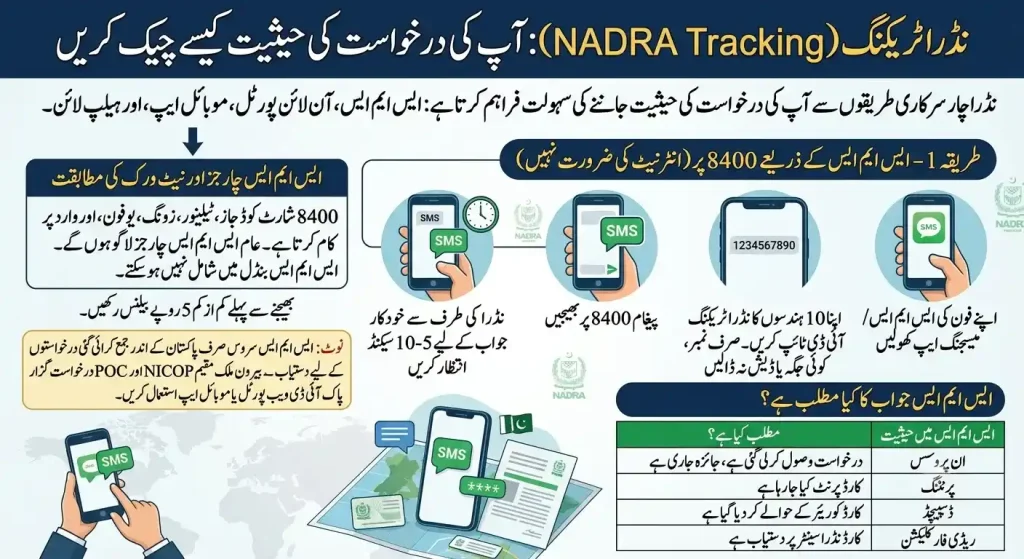
The fastest method for domestic applicants. Works 24/7 on any Pakistani mobile network — no data connection required.
Step-by-Step SMS Instructions
- Open your phone’s SMS / Messaging app
- Type your 10-digit NADRA Tracking ID — numbers only, no spaces or dashes
- Send the message to 8400
- Wait 5–10 seconds for an automated reply from NADRA
NADRA provides four official channels to check your application status: SMS, online portal, mobile app, and helpline. Each method uses your 10-digit Tracking ID as the query key and returns real-time updates from NADRA’s central database.
SMS Charges & Network Compatibility
The 8400 shortcode works on Jazz, Telenor, Zong, Ufone, and Warid. Standard SMS charges apply and vary by network operator. If you are subscribed to an SMS bundle, tracking messages sent to 8400 may not be covered by your package and could be charged separately. Keep a minimum balance of Rs. 5 before sending.
Note: The SMS service is available only for applications submitted within Pakistan. NICOP and POC applicants outside Pakistan must use the Pak-ID web portal or mobile app instead
What Does the SMS Reply Mean?
The automated SMS reply follows a standardized format: “Your application [Tracking ID] is currently [status] as of [date].” If your application has been printed and dispatched, the message may also include the courier service name and a delivery tracking number. Government Schemes
| Status in SMS | What It Means |
|---|---|
| In Process | Application received, under review |
| Printing | Card being printed |
| Dispatched | Card handed to courier |
| Ready for Collection | Card available at NADRA center |
Method 2 — Online via Pak-ID (Pak Identity) Website
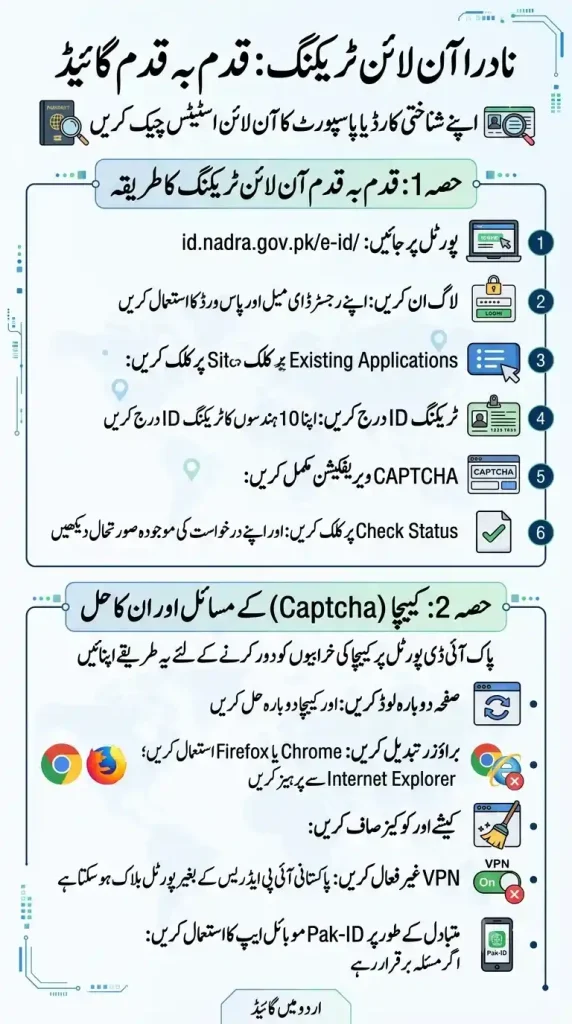
Step-by-Step Online Tracking
- Visit the official portal: id.nadra.gov.pk/e-id/
- Log in using your registered email and password
- Navigate to “Existing Applications”
- Enter your 10-digit Tracking ID
- Complete the CAPTCHA verification
- Click “Check Status” to view your real-time application stage
Captcha Issues & How to Fix Them
Captcha errors are one of the most reported issues on the Pak-ID portal. Try these fixes:
- Refresh the page and attempt the CAPTCHA again
- Switch browsers — Chrome or Firefox work best; avoid Internet Explorer
- Clear browser cache and cookies, then reload
- Disable VPN — NADRA’s portal may block non-Pakistani IP addresses
- If the issue persists, switch to the Pak-ID mobile app as an alternative
Method 3 — Pak-ID Mobile App
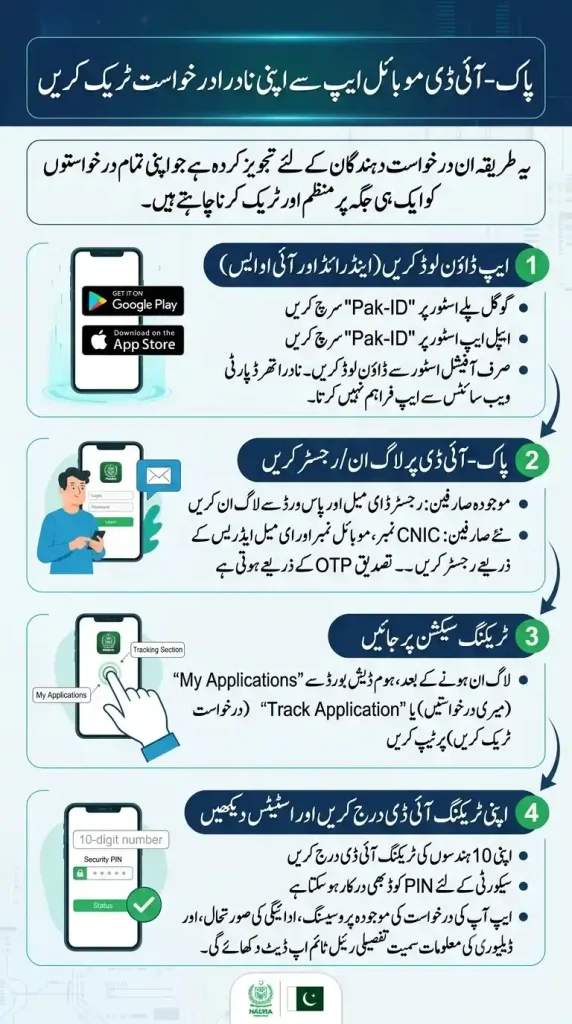
The recommended method for applicants who want to manage and track all their applications in one place.
Download the App (Android & iOS)
- Android: Search “Pak-ID” on Google Play Store
- iOS: Search “Pak-ID” on Apple App Store
Only download from official store listings. NADRA does not distribute the app through third-party websites.
Login / Register on Pak-ID
- Existing users: Log in with your registered email and password
- New users: Register using your CNIC number, mobile number, and a valid email address — verification is done via OTP
Navigate to Tracking Section
Once logged in, tap “My Applications” or “Track Application” from the home dashboard.
Enter Your Tracking ID & View Status
Enter your 10-digit Tracking ID. You may also need to enter a PIN code for security. The app will display a detailed real-time status update including your application’s current processing stage, payment status, and dispatch information.
Method 4 — NADRA Helpline (Call 1777 or +92-51-111-786-100)
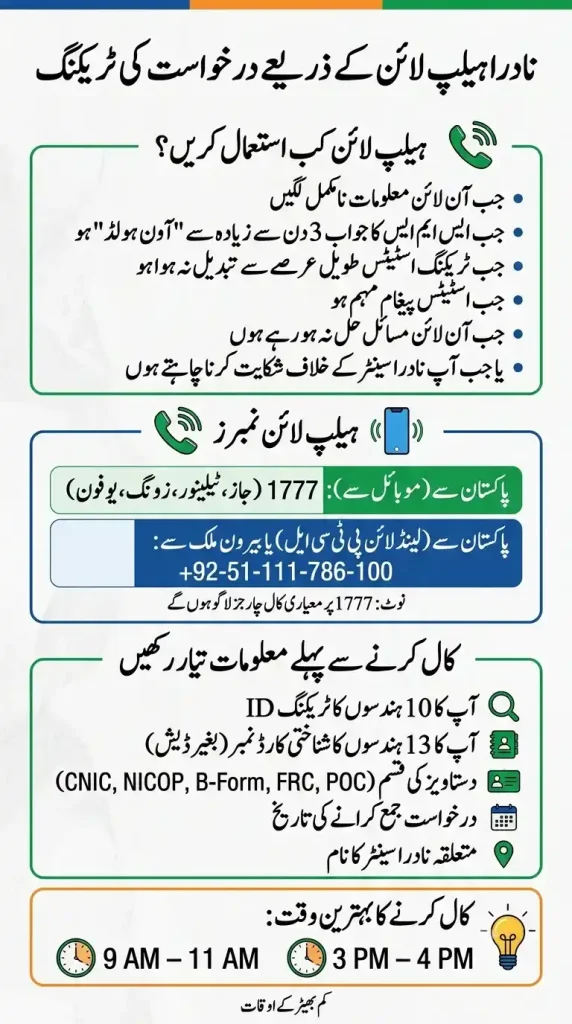
Use the helpline when digital methods return unclear results or your application requires direct intervention.
- From mobile (within Pakistan): Dial 1777 — works on Jazz, Telenor, Zong, Ufone
- From landline (PTCL): Dial +92-51-111-786-100
- From overseas: Dial +92-51-111-786-100 (the 1777 shortcode does not work abroad)
Note that calling 1777 incurs standard call charges as per your mobile network operator’s tariff. It is not a toll-free number.
When to Use the Helpline
- SMS reply shows “On Hold” for more than 3 days
- Tracking status has not updated for an unusually long time
- You received a conflicting or confusing status message
- Your application shows errors you cannot resolve online
- You need to file a complaint against a NADRA registration center
What Information to Keep Ready Before Calling
Have these details on hand before the call connects — this significantly reduces call time:
- Your 10-digit NADRA Tracking ID
- Your 13-digit CNIC number (without dashes)
- Document type you applied for (CNIC, NICOP, B-Form, FRC, or POC)
- Date of application submission
- Name of the NADRA registration center where you applied
💡 Best calling times: 9 AM – 11 AM or 3 PM – 4 PM tend to be the least busy windows.
Tracking for Overseas Pakistanis (NICOP, POC & FRC)
If you are living outside Pakistan and applied for a NICOP, POC, or FRC through the Pak-ID online portal, your tracking process is different from domestic applicants. This section covers exactly what works, what does not, and who to contact from abroad.
Why SMS 8400 Does Not Work Abroad
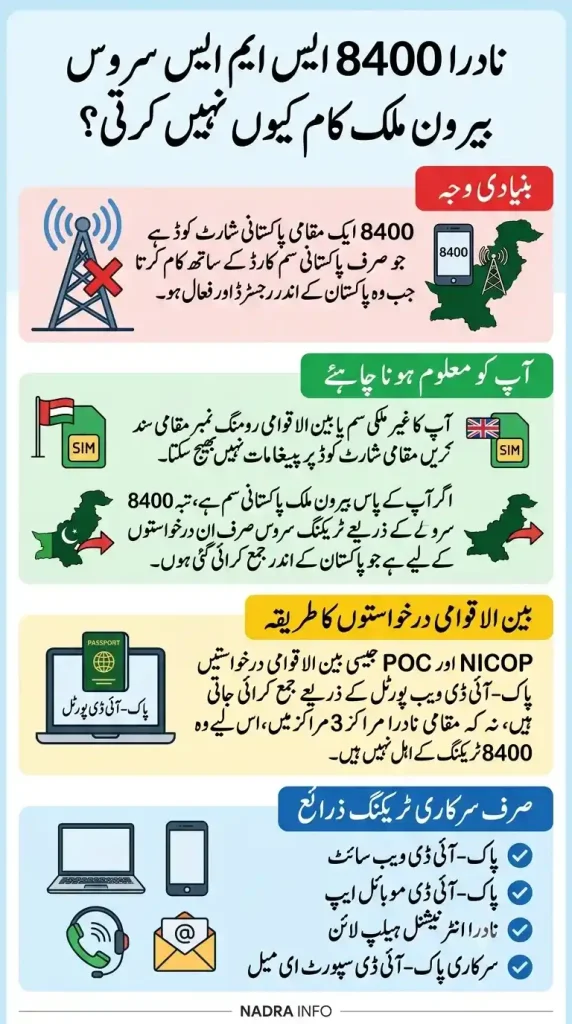
The 8400 shortcode is a domestic Pakistani network service. It only works from a Pakistani SIM card registered and active within Pakistan. If you are outside Pakistan:
- Your foreign SIM or international roaming number cannot send messages to a domestic shortcode
- Even with a Pakistani SIM abroad, the SMS tracking service is available only for applications submitted within Pakistan
- NICOP and POC applications are submitted through the Pak-ID web portal, not at domestic NADRA registration centers — making them ineligible for 8400-based tracking
The only official channels available to overseas applicants are the Pak-ID website, Pak-ID mobile app, NADRA international helpline, and official Pak-ID support email
How to Track NICOP, POC, or FRC from Outside Pakistan
The 8400 shortcode works on Jazz, Telenor, Zong, Ufone, and Warid. Standard SMS charges apply and vary by network operator. If you are subscribed to an SMS bundle, tracking messages sent to 8400 may not be covered by your package and could be charged separately. Keep a minimum balance of Rs. 5 before sending.
Note: The SMS service is available only for applications submitted within Pakistan. NICOP and POC applicants outside Pakistan must use the Pak-ID web portal or mobile app instead
What Does the SMS Reply Mean?
You have three digital options as an overseas applicant:
Option 1 — Pak-ID Website (Recommended)
- Visit id.nadra.gov.pk
- Log in with your registered email and password
- Go to “Existing Applications” or “My Applications”
- Select your NICOP / POC / FRC application
- Your current processing stage, payment status, and dispatch details will be visible on screen
Once printed and approved, cards are dispatched via courier to your registered overseas address. Track the courier separately using the tracking number that appears in your Pak-ID status once dispatched.
Option 2 — Pak-ID Mobile App
Download the Pak-ID app on Android or iOS, log into your account, and check your application status under “My Applications” — same as the website, available from any country.
Option 3 — NADRA International Helpline
The 1777 shortcode does not work from outside Pakistan. For overseas callers, use:
- Phone: +92-51-111-786-100
- Email: info.pakid@nadra.gov.pk / support.pakid@nadra.gov.pk
For unique queries not covered on the website, you can email NADRA directly at support.pakid@nadra.gov.pk. Simownerpk
Have your 10-digit Tracking ID, registered email address, and document type (NICOP / POC / FRC) ready before reaching out.
Tracking via Pakistani Embassy or Consulate
This is one of the most common misconceptions among overseas Pakistanis — many assume the embassy handles NICOP or POC tracking. It does not.
NICOP, POC, and FRC services are not provided at Pakistani consulates. NADRA has fully migrated these services online through the Pak Identity portal at id.nadra.gov.pk. For any query or technical support, contact NADRA directly — do not call the consulate.
However, embassies and consulates can still help in two specific situations:
1. Biometric Verification (First-Time Applicants)
For first-time NICOP applicants, biometric capture is mandatory and may require a visit to the nearest NADRA Registration Centre or Pakistani consulate or mission abroad. NADRA Pak Identity counters have been established in 16 Pakistani missions worldwide to facilitate overseas Pakistanis.
2. Applications Submitted at a Consulate (Manual/Legacy Applications)
If your application was submitted manually through a NADRA registration center or Mobile Registration Team (MRT) at a consulate, you can track it via NADRA’s website using your 10-digit Tracking ID, or call NADRA’s call center at +92-51-111-786-100.
⚠️ Important: If your application was submitted through the Pak-ID online portal, it is fully managed by NADRA — not the consulate. Track it through Pak-ID only.
| Situation | Track Via |
|---|---|
| Applied online via Pak-ID | Pak-ID website or app |
| Applied via consulate / MRT | nadra.gov.pk + helpline |
| Need biometrics done abroad | Book appointment at nearest Pakistani mission |
| Query not resolved online | Email: support.pakid@nadra.gov.pk |
Understanding Your NADRA Tracking Status — What Each Status Means?
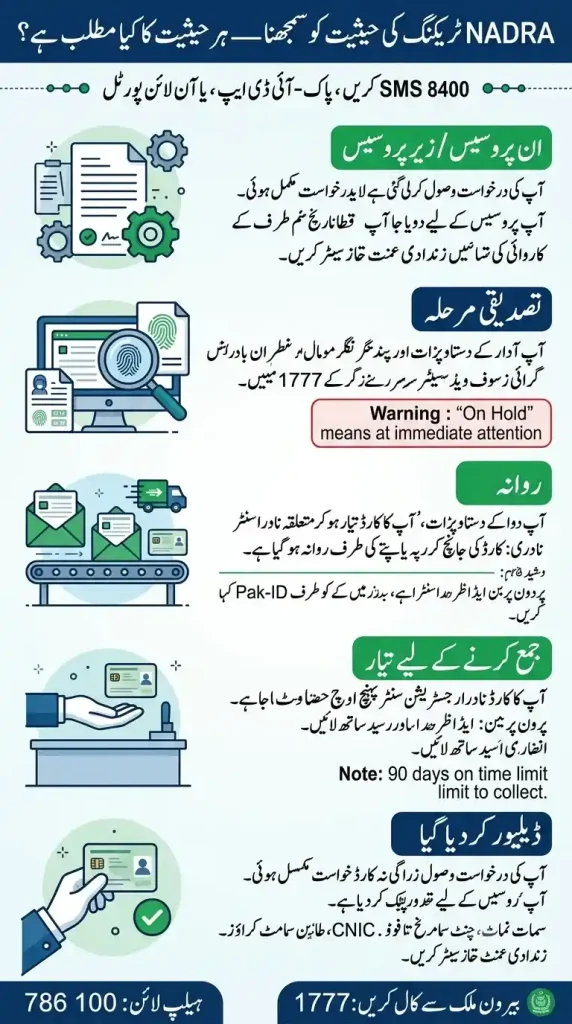
When you check your application via SMS at 8400, the Pak-ID app, or the online portal, NADRA returns one of several standardized status messages. Here is exactly what each one means and what you should do at every step.
In Process / Under Process
Your application has been received and is now sitting in NADRA’s processing queue. No action is needed from your side at this point.
If this status does not change: Call the helpline at 1777 if the expected processing time of 7 working days passes with no change.
Verification Stage
NADRA is cross-checking your submitted documents, fingerprints, and photograph against the national identity database. Keep your registered mobile number active — NADRA may SMS you directly if anything is missing.
If this stage runs unusually long: A data mismatch or incomplete document is likely the cause. Visit your application center with your Tracking ID or call 1777 without delay.
⚠️ If your tracking status shows “On Hold” — your application has been flagged and requires immediate attention. Contact NADRA without delay.
Dispatched
Your card has left the facility and is on its way.
- Domestic applicants — your card is headed to your selected NADRA center or home address.
- Overseas applicants holding NICOP or POC documents — your card is with an international courier bound for your registered address abroad.
Check your Pak-ID status — the courier name and tracking number will be included once it is on the way.
Ready for Collection
Your card has arrived at your designated NADRA registration center. Visit in person and bring the following:
- Your original CNIC or photo ID
- Your application receipt
If someone is collecting on your behalf: They must carry a written authorization along with their own valid CNIC.
📌 Cards not collected within 90 days will be returned to the NADRA central office. Do not delay your visit.
Delivered
Your application is now complete. Your card has been collected or delivered. Before using it, take a moment to verify the following:
- Name spelling
- Date of birth
- 13-digit CNIC number
- Photograph
- Smart chip condition
⚠️ If anything looks wrong, visit a NADRA center immediately with your receipt to file a correction request.
📌 For overseas queries, reach the call centre at 786 100 from Islamabad or via international call for overseas support.
How Long Does NADRA Take? Processing Time Guide
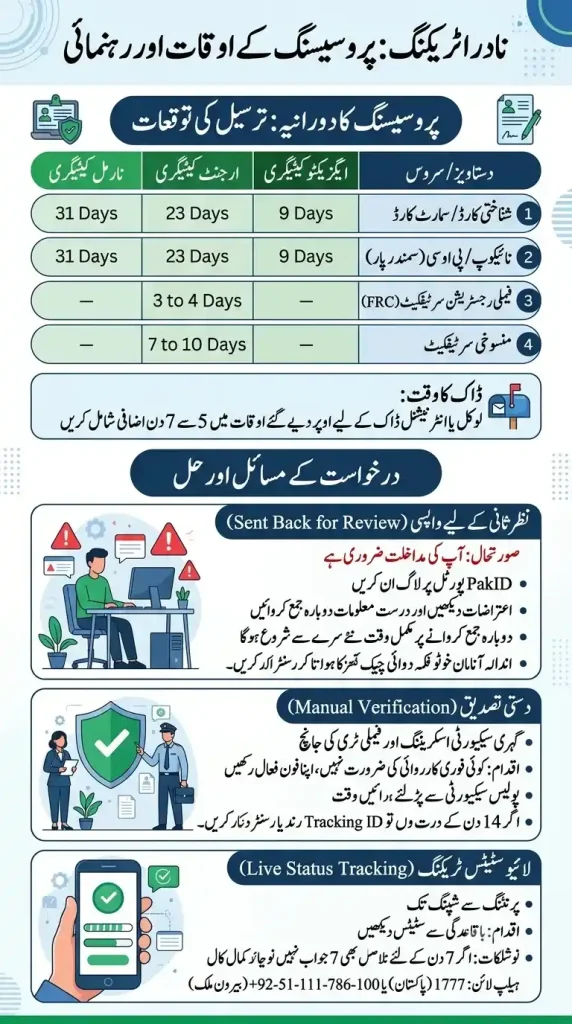
Delivery Timeline Expectations
When you apply for identity documents via your digital account or an office, your wait time depends on your chosen processing category and document type. Here is the breakdown of official processing times:
| Document / Service | Executive Category | Urgent Category | Normal Category |
| CNIC / Smart NIC | 9 Days | 23 Days | 31 Days |
| NICOP / POC (Overseas) | 9 Days | 23 Days | 31 Days |
| Family Registration Certificate (FRC) | — | 3 to 4 Days | — |
| Cancellation Certificate | — | 7 to 10 Days | — |
📬 Mailing Window: If you submit your application online, you must add an extra 5 to 7 days to the timelines above for local or international mailing, depending on your physical location.
Sent Back for Review
Your application has encountered an issue and requires your direct intervention before it can move forward. This usually happens if the system flags missing details or if there is a technical error, such as a facial blockage on your uploaded photo.
Troubleshooting Advice: Be aware that the entire approval clock restarts from the exact date you resubmit. If you cannot clear the facial blockage warning online, you will need to visit your nearest registration center for physical biometrics.
What Action to Take: Log into your PakID Portal account immediately, review the specific rejection notes, and resubmit the corrected information or photos.
Manual Verification
Your file has been flagged for deep security screening rather than automated database matching. This is a standard security protocol used to verify family trees, citizenship claims, or complex overseas data.
- What Action to Take: No immediate action is required from you, but you must keep your registered phone number active. You may be contacted by local authorities or required to facilitate routine background checks.
- Troubleshooting Advice: Cases requiring police verification can extend well past your original estimated delivery date. If this status does not change within 14 business days, visit your local center with your tracking ID to see if an official witness verification form is needed.
Live Status Tracking
Your application is moving through the production queue, and its progress can be monitored in real time. This service allows citizens inside Pakistan and those living overseas to view their document’s current stage from printing to shipping.
Troubleshooting Advice: If your live status shows no movement for more than 7 days beyond your category’s standard timeline, call the official helpline at 1777 (within Pakistan) or +92-51-111-786-100 (from overseas) to confirm your card has not been placed on an unlisted administrative hold.
What Action to Take: Actively monitor your application journey via the official PakID Portal or mobile application to ensure you do not miss any sudden status updates.
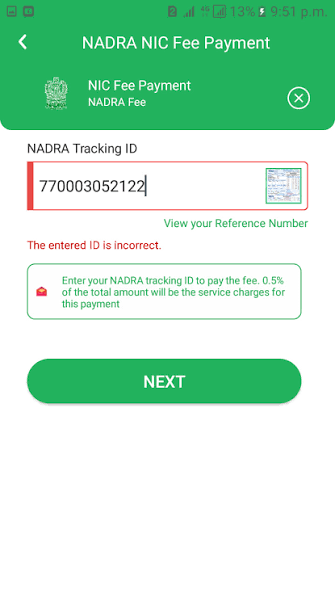
NADRA Tracking ID Payment — How to Pay Your NADRA Fee
Before paying, confirm the exact amount due for your document type and selected processing speed. Paying a wrong amount is one of the most common reasons for application delays.
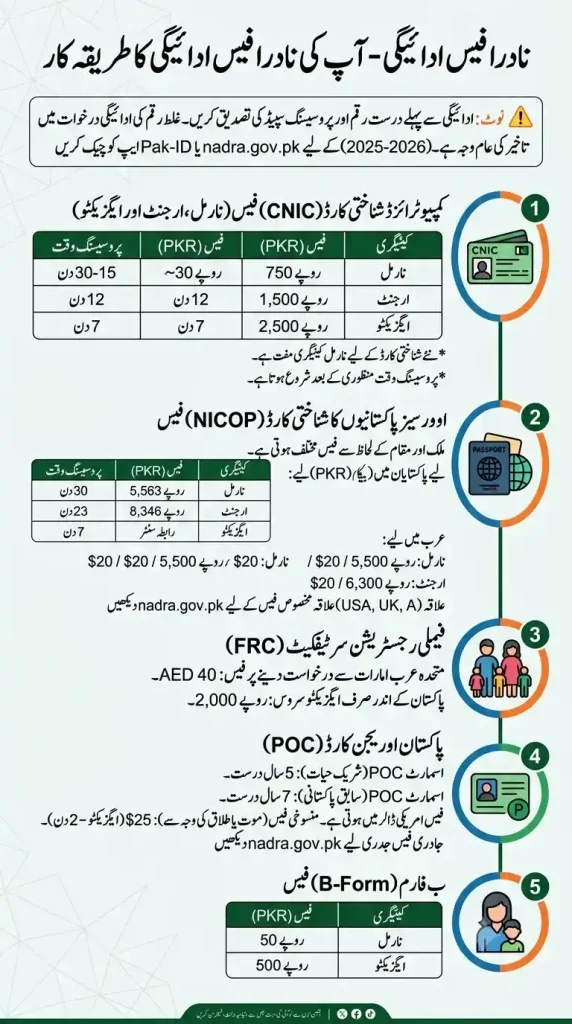
NADRA Application Fee Structure (CNIC, NICOP, FRC, POC)
⚠️ Note: Fees below reflect the latest available 2025–2026 rates. NADRA periodically revises its fee schedule — always verify the exact amount on nadra.gov.pk or the Pak-ID app before payment.
1- CNIC Fee — Normal, Urgent & Executive
A new Smart CNIC costs Rs. 750 for normal, Rs. 1,500 for urgent, and Rs. 2,500 for executive processing.
| Category | Fee (PKR) | Processing Time |
|---|---|---|
| Normal | Rs. 750 | 15–30 days |
| Urgent | Rs. 1,500 | 12 days |
| Executive | Rs. 2,500 | 7 days |
The fresh applicant is issued the NADRA CNIC for free of cost under the normal category. The fees above apply to renewal, modification, and duplicate applications.
Service timelines for Normal, Urgent, and Executive categories commence only after the approval of the application.
2- NICOP Fee — Normal, Urgent & Executive
NICOP fees vary by region and application location. NADRA categorizes countries into two zones — Zone A and Zone B — to determine the fee structure. The cost also changes based on the processing speed you choose: Normal, Urgent, or Executive.
If applying from within Pakistan (PKR):
| Category | Fee (PKR) | Processing Time |
|---|---|---|
| Normal | Rs. 5,563 | ~30 days |
| Urgent | Rs. 8,346 | ~23 days |
| Executive | Contact center | ~7 days |
What Action to Take: Log into your PakID Portal account immediately, review the specific rejection notes, and resubmit the corrected information or photos.
If applying from abroad (USD — Zone A: USA, UK, Canada, Europe):
For Arab countries, the normal NICOP processing fee is Rs. 5,500 or US$20, while urgent processing costs Rs. 8,300 or US$30. The executive category is priced at Rs. 11,000 or US$40.
For region-specific rates (Saudi Arabia in SAR, UAE in AED, etc.), check the official NADRA fee page at nadra.gov.pk/feeStructure.
3- FRC & POC Fee
FRC (Family Registration Certificate):
NADRA has established a fixed fee of AED 40 for Family Registration Certificates when applying from the UAE. For domestic applicants, FRC costs Rs. 2,000 under executive service only.
POC (Pakistan Origin Card):
Smart POC (Spouse-based) is valid for 5 years. Smart POC (Ex-Pakistani) is valid for 7 years. POC fees are charged in USD and vary by service type. POC Cancellation due to death or divorce costs $25 under executive processing (2 days). For current POC issuance fees, refer to nadra.gov.pk/fee-structure as rates update periodically
4- B-Form Fee
The Child Registration Certificate (CRC), commonly called the B-Form, is available for Rs. 50 under normal processing and Rs. 500 for executive category.
| Category | Fee (PKR) |
|---|---|
| Normal | Rs. 50 |
| Executive | Rs. 500 |
POC (Pakistan Origin Card):
Smart POC (Spouse-based) is valid for 5 years. Smart POC (Ex-Pakistani) is valid for 7 years. POC fees are charged in USD and vary by service type. POC Cancellation due to death or divorce costs $25 under executive processing (2 days). For current POC issuance fees, refer to nadra.gov.pk/fee-structure as rates update periodically
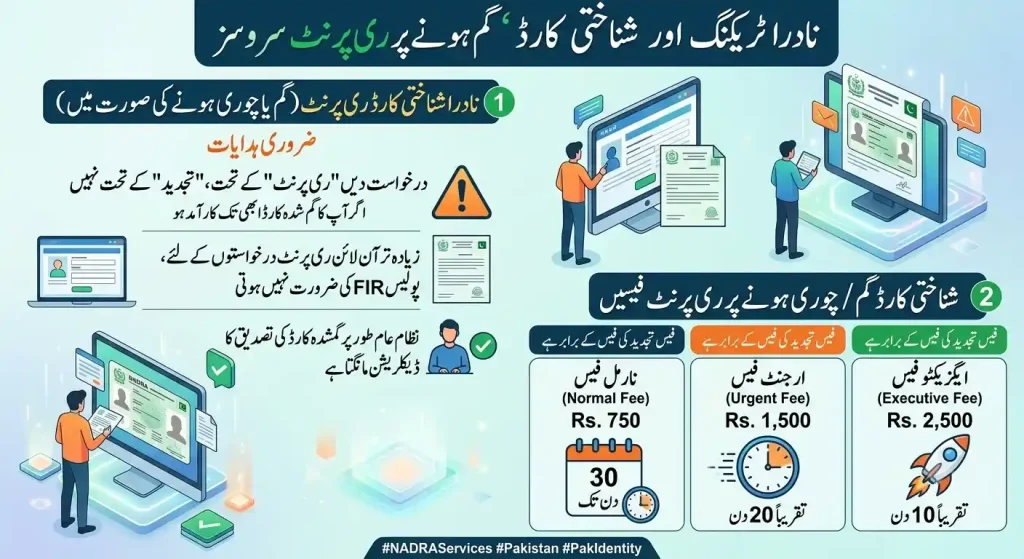
Fee for Lost / Stolen Card Replacement
NADRA charges the same fee for CNIC reprint as for renewal, depending on the urgency level selected — Rs. 750 for normal (up to 30 days), Rs. 1,500 for urgent (around 20 days), and Rs. 2,500 for executive (around 10 days)
Apply under “Reprint” — not “Renewal” — for a lost or stolen card that is still valid. For most online CNIC reprint applications, NADRA does not require uploading a police FIR — the system usually asks for a declaration confirming that the card is lost
Accepted Payment Methods
NADRA accepts payment through four official channels. Payment is made at the time of application via the Pak-ID app, online portal, or at the NADRA registration center.
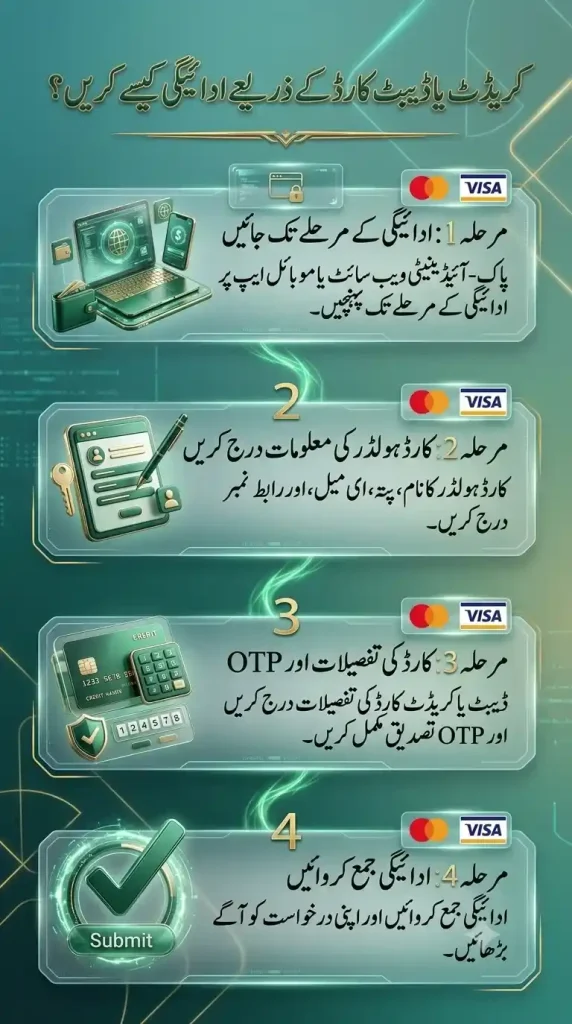
Payment via Credit / Debit Card
Available on the Pak-ID website and Pak-ID mobile app. Supports all major Visa and Mastercard-issued debit and credit cards from Pakistani banks. This is the recommended method for online applicants — payment is instant and your Tracking ID is generated immediately after confirmation.
Payment via EasyPaisa
Pay through your EasyPaisa mobile account or EasyPaisa app. Select “Pay Bills” → “Government” → “NADRA” and enter your Tracking ID or application reference. Applicable for Smart NIC and FRC applications.
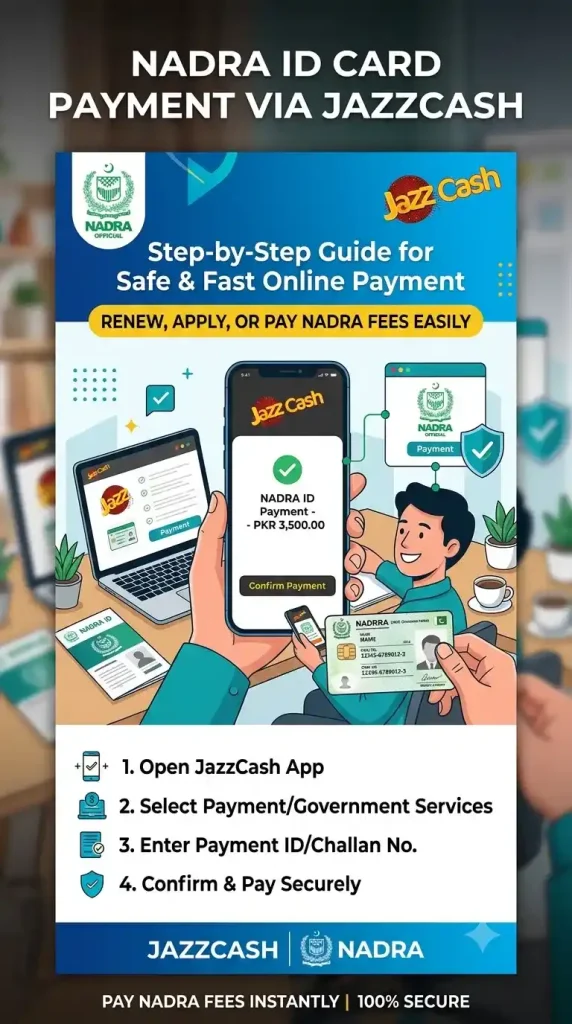
Payment via JazzCash
Pay through your JazzCash mobile account or JazzCash app. Navigate to “Pay Bills” → “NADRA” and enter your application details. Applicable for Smart NIC and FRC applications.
Payment via eSahulat
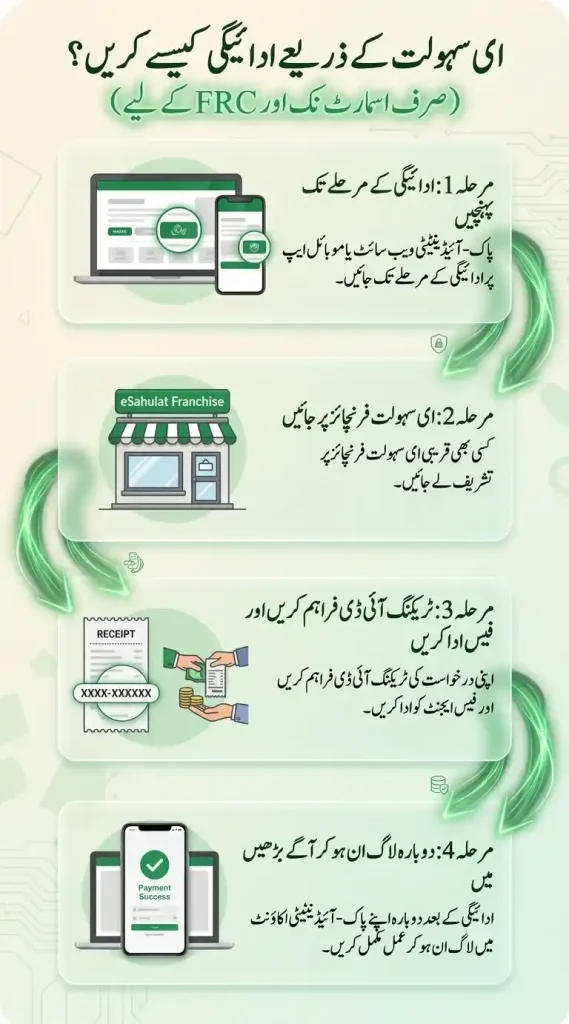
For online applications via the Pak Identity website or mobile app, you will need a credit/debit card or an e-payment franchise service like eSahulat. Visit the nearest eSahulat franchise with your Tracking ID and the exact fee amount in cash. The franchise operator processes the payment on your behalf. Applicable for Smart NIC and FRC only.
When Does Payment Appear in Tracking Status?
Payment confirmation typically reflects in your NADRA tracking status within 15–30 minutes of a successful transaction. If paying via Pak-ID app or website using a card, the update is near-instant. For EasyPaisa, JazzCash, and eSahulat, allow up to 2–4 hours for the payment to sync with NADRA’s system before checking your status again.
What If Payment Was Made But Status Didn’t Update?
If your payment was deducted but the tracking status still shows unpaid after 24 hours, follow these steps:
- Take a screenshot of your payment confirmation — transaction ID, amount, date, and time
- Check your bank or wallet statement to confirm the deduction
- Log into Pak-ID and check under “My Applications” — sometimes status updates there before SMS
- Call NADRA helpline at 1777 with your Tracking ID and payment transaction reference ready
- Email NADRA at support.pakid@nadra.gov.pk with your proof of payment attached
How to Recover Lost NADRA Tracking ID Online
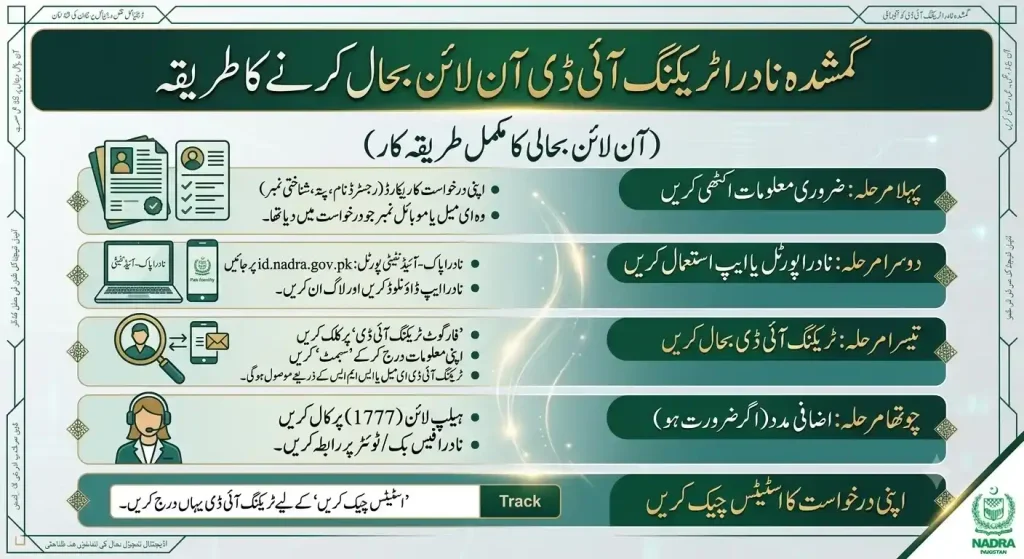
Losing your receipt can be frustrating, but you can easily recover your Tracking ID (TID) to check your application status. Here is a breakdown of the fastest ways to retrieve your information:
- Call the Official Helpline (Fastest Method): If you are within Pakistan, use a mobile phone to Dial 1777. If you are calling from a landline or from abroad, contact them at +92 51 111 786 100. A customer service agent will look up your citizen record and share your tracking details once you provide your CNIC number.
- Check the PakID Mobile App: If you prefer a digital route, log in to your active account via the official PakID Mobile App (available for both Android and iOS). Navigate to your Inbox or dashboard history to view your submitted paperwork and find your corresponding IDs instantly.
- Send an Official Email: When digital apps face a technical glitch, you can use standard written communication. Send an email to the central service division at csd@nadra.gov.pk, making sure to state your full name, CNIC, the date you visited the center, and your application details so they can fetch your data.
- Visit a Local Registration Centre (NRC): If you are in a rush and need an immediate physical backup, visit your nearest NADRA center. Go straight to the token counter or speak directly with the manager. By providing your original card (or family data like a child’s B-form or CRC), the officer can instantly look up your biometric profile and print a duplicate tracking slip on the spot.
What to Do When Your NADRA Tracking ID Shows an Error
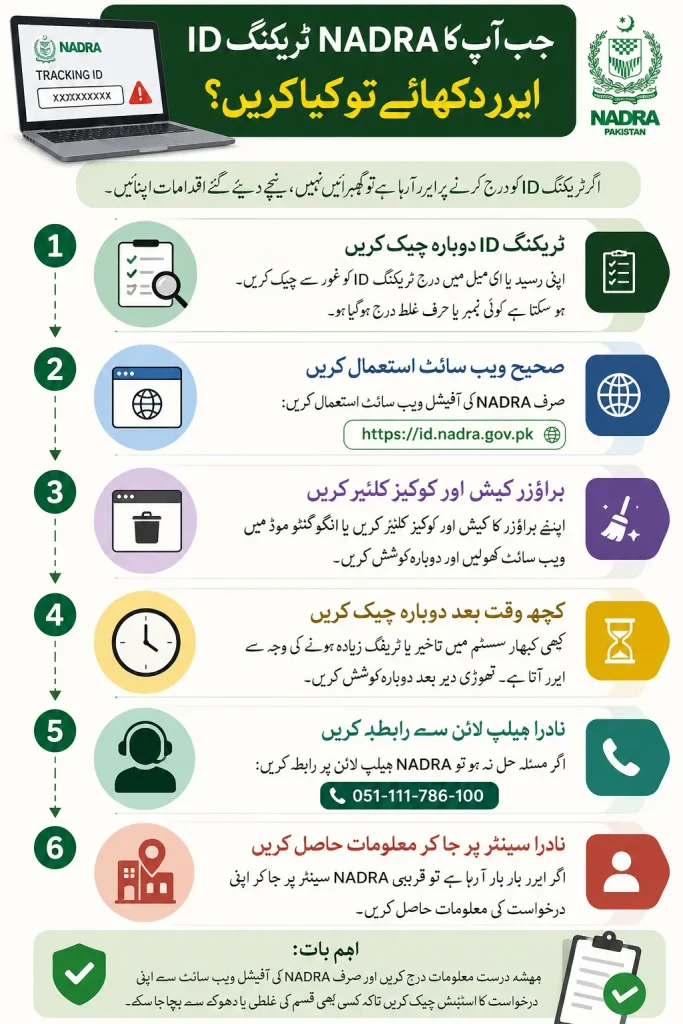
- If your NADRA Tracking ID returns No Record Found, an invalid tracking ID message, or no status update, first recheck the 10-digit Application Tracking ID on your receipt, confirmation email, or token receipt. Common causes include wrong digits, missing digits, typos, spaces, hyphens, or a simple data entry mistake.
- For a recently submitted application, the application data may still be in initial processing, verification, or waiting for a data update in the tracking system. In such cases, wait 24 to 48 hours and try again before assuming there is a system problem.
- If the tracking status remains unchanged for several days or shows the same stage, the issue may be a processing backlog, verification hold, or system sync delay. Compare the expected processing time with your selected category: Normal, Urgent, or Executive.
- You can also send an SMS to 8400 from a Pakistani SIM to receive a real-time status update. Make sure your SMS balance is available, the SIM is not blocked or expired, and that roaming permissions are not affecting delivery.
- If the Pak-ID website or id.nadra.gov.pk portal is facing high traffic, a Captcha issue, or temporary website downtime, use the Pak-ID app, switch networks, clear browser cache and cookies, try Chrome or Firefox, or disable VPN before reloading the page.
- When the error persists, contact official NADRA support through the helpline, email support, PakID Live Chat, or the 24/7 NADRA Call Center. Keep your CNIC number, Tracking ID, and personal details ready so an agent can locate application records and help resolve issue quickly. If needed, visit a NADRA Registration Centre (NRC) or NADRA Mega Center for assistance with delayed applications.
Keep Your Tracking ID Private
Avoid sharing your tracking ID or tracking IDs publicly on any public platform. Visible tracking numbers, shipping details, delivery addresses, recipient names, and contact numbers can create a security risk. It is dangerous because scammers, fraudsters, thieves, malicious actors, and hackers may exploit this information to intercept deliveries, steal personal information, gain access to accounts, take control of private accounts, cause package theft, disrupt delivery, parcel delivery, and misuse an exact delivery address or delivery schedule before you arrive home.
Many attacks start through courier websites and courier services, where criminals harvest data for targeted phishing, SMS phishing, smishing, social engineering scams, and identity theft. They may impersonate TCS, send text messages or scam SMS messages, make a call about a problem, appear legitimate, and trick users into sharing an OTP, One-Time Password, verification code, login code, or completing verifying steps. This can lead to SIM-swapping, account takeover, misuse of messaging apps, app activations, WhatsApp, and fraud carried out under the guise of support while citing tracking ID details.
How to Report a NADRA Tracking Issue
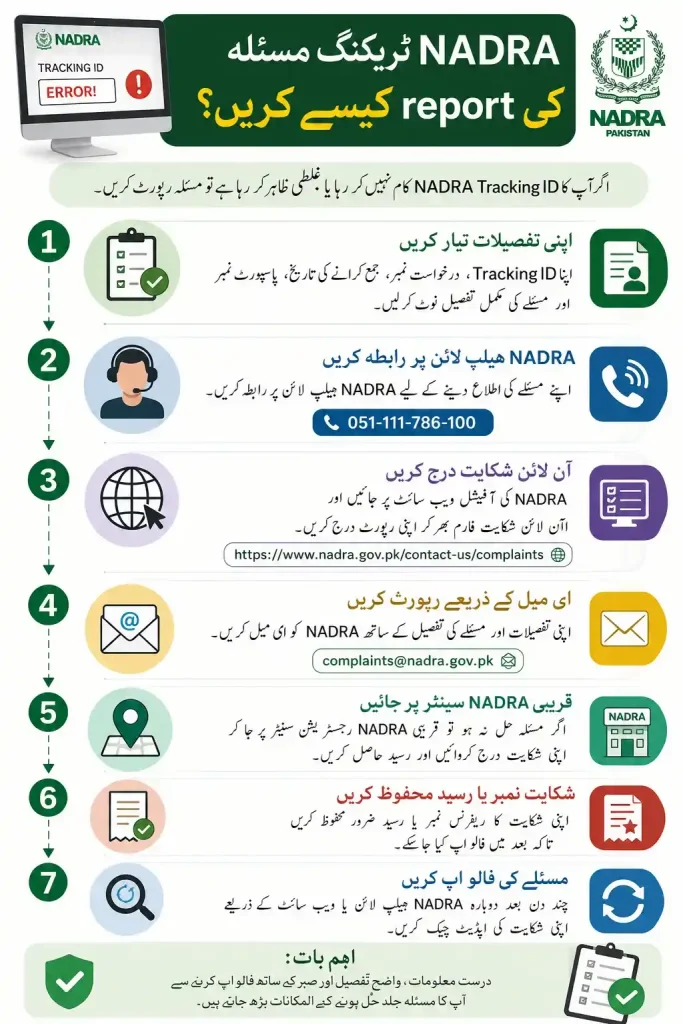
From my experience, the fastest effective ways to handle a tracking problem are through the online portal, PakID Portal, Pak-Identity App, or the CMS (Online Complaint Management System) and NADRA Complaint System. If you want to track your application status, first log in to your account, check the application inbox, and review your Tracking ID. If there is an issue, dispute, service complaint, or you need to file complaint, submit a ticket with a clear description, attach relevant receipts and documents, and include both your Tracking ID and complaint ID so the case can be reviewed directly by NADRA customer service.
If you applied online, you can also send a detailed email through Email to csd@nadra.gov.pk. Another option is to call the official helpline or Official Hotline using 1777 from a mobile phone in Pakistan or +92-51-111-786-100 from landlines and overseas locations. In many cases, complaints are resolved within 48 hours, making these chann
How to Know When Your NADRA ID Is Ready for Collection
To check whether your NADRA ID card is ready, use NADRA Tracking through official NADRA channels. From my experience, the fastest way is the NADRA PakID Mobile App or PakID Mobile App. Simply download, open, log in to the Pak-ID application, navigate to the Application Inbox or Tracking section, enter your 10-digit Tracking ID and PIN Code, then view real-time status, status updates, and updates linked to your Application. Your Tracking, tracking status, and application status will show whether the request is still in processing, completed, or ready for the next step and collection. Keep your registration receipt available when you track your application online.
You can also use SMS or the SMS Service by type-ing your Tracking ID in a message and send it to 8400 to receive a return text with the current status. If further help is needed, contact the NADRA Call Center, call the helpline at 1777 in Pakistan or +92 51 111 786 100 from overseas. Provide your details to a customer support agent and follow the instructions issued by NADRA and the National Database and Registration Authority regarding your ID card collection.
Next Steps After Collecting Your NADRA ID
Check Your ID Card
After receiving your CNIC or NICOP, carefully review all details, including your name, CNIC number, expiry date, and marital status. Report any errors immediately to avoid future issues.
Update Your Bank Records
Submit a copy of your updated ID card to your bank. Keeping your records current helps prevent account restrictions, transaction failures, ATM issues, and mobile banking disruptions.
Verify Your SIM Registration
Visit your mobile network’s franchise (Jazz, Telenor, Zong, or Ufone) to complete biometric verification and link your SIM with your updated CNIC. This helps avoid service suspension due to outdated records.
Use the PakID App
Download the PakID Mobile App or use the PakID Web Portal to manage future renewals, modifications, and reprints online without visiting a NADRA center.
Inform Other Institutions
Share your updated ID details with utility providers, employers, and other relevant organizations. This ensures your billing records, payroll information, taxes, and benefits remain accurate and up to date.